

Studio Overview
The Studio is the live broadcast control center. It provides real-time playback control, audio mixing, and collaboration features for on-air broadcasting.
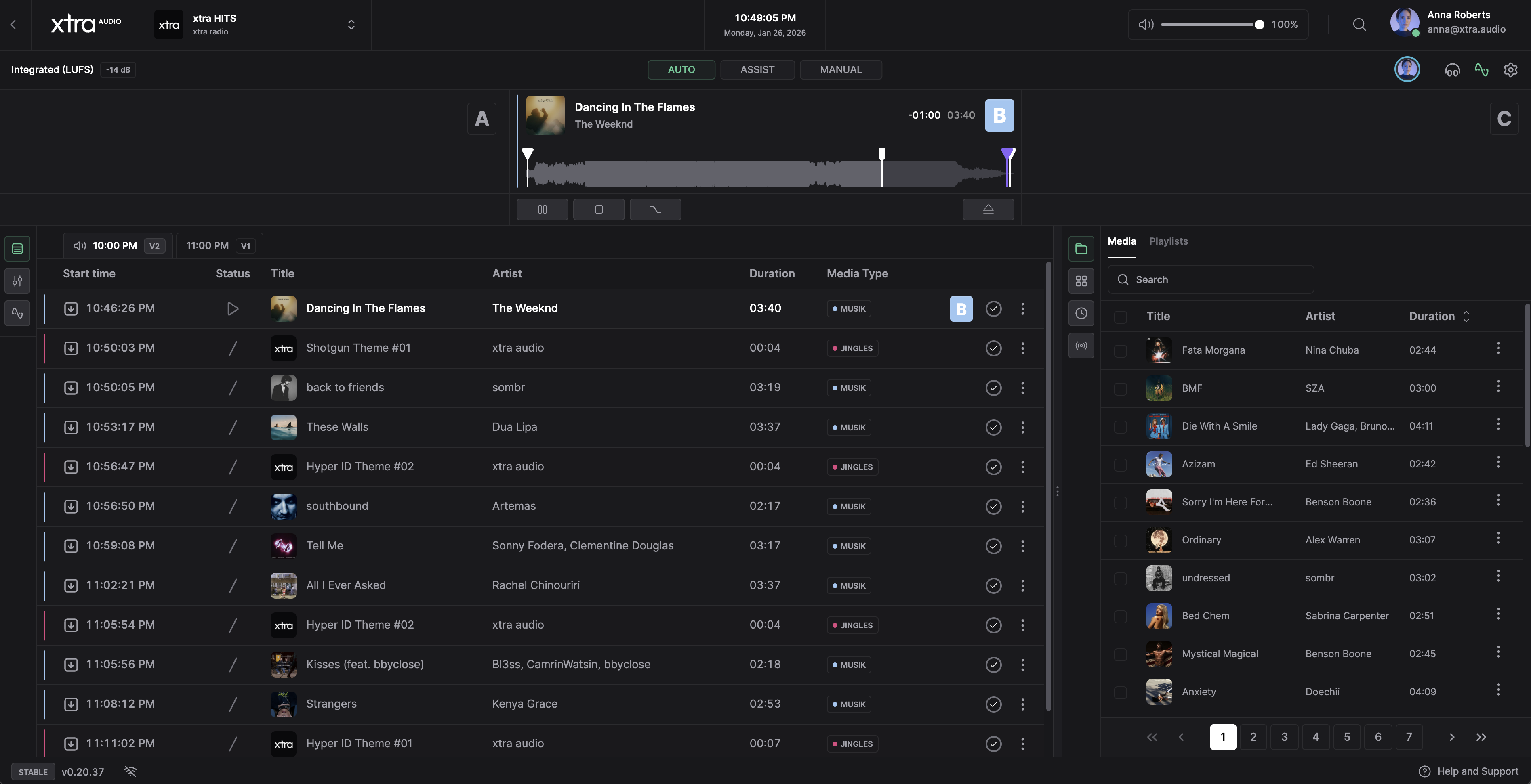
Main Features
- Playback Control: Multiple mixer channels with transport controls
- Playlist Management: Queue and reorder tracks during broadcast
- Audio Mixer: Volume, speed, and peak monitoring per channel
- Cartwall: Instant sound playback grid for jingles and effects
- Audio Processing: Real-time sound processing
- Collaboration: Multiple users can control the studio simultaneously
Prerequisites
Before using the Studio:
- Your user account requires Studio access permissions
- A supported browser with Web Audio API support
If the station is not running, a Start Station button is displayed directly in the Studio interface.
Opening the Studio
- Open Studio in the station sidebar
- The Studio interface loads with the current broadcast state
The Studio connects to the station's audio engine automatically. Changes affect the live broadcast in real-time.
Interface Overview
| Area | Purpose |
|---|---|
| Top Bar | Mode selector, monitor button, user presence, settings |
| Player Section | Mixer channels with transport controls |
| Panel A | Playlist, Mixer, Processing, Session Editor, Mix Editor |
| Panel B | Media Library, Cartwall, Clock, Relay |
| Toolbar | Station version, latency indicator, help link |
Panels can be resized by dragging the divider between them.
Next Steps
- Playback Modes - AUTO, ASSIST, and MANUAL modes
- Playlist Queue - Managing the playback queue
Related
- Planner - Schedule automated programming
- Session Editor - Record voicetracks
- Station Configuration - Configure audio processing